FIELD NOTES / 04 · SMART SPREADSHEETS
Judge Sheets: AI Spreadsheet Columns with Jev
A column header with superpowers.
Type “Urgency” or “Ready to buy?” and let the rows fill themselves. Your spreadsheet gets the hint.
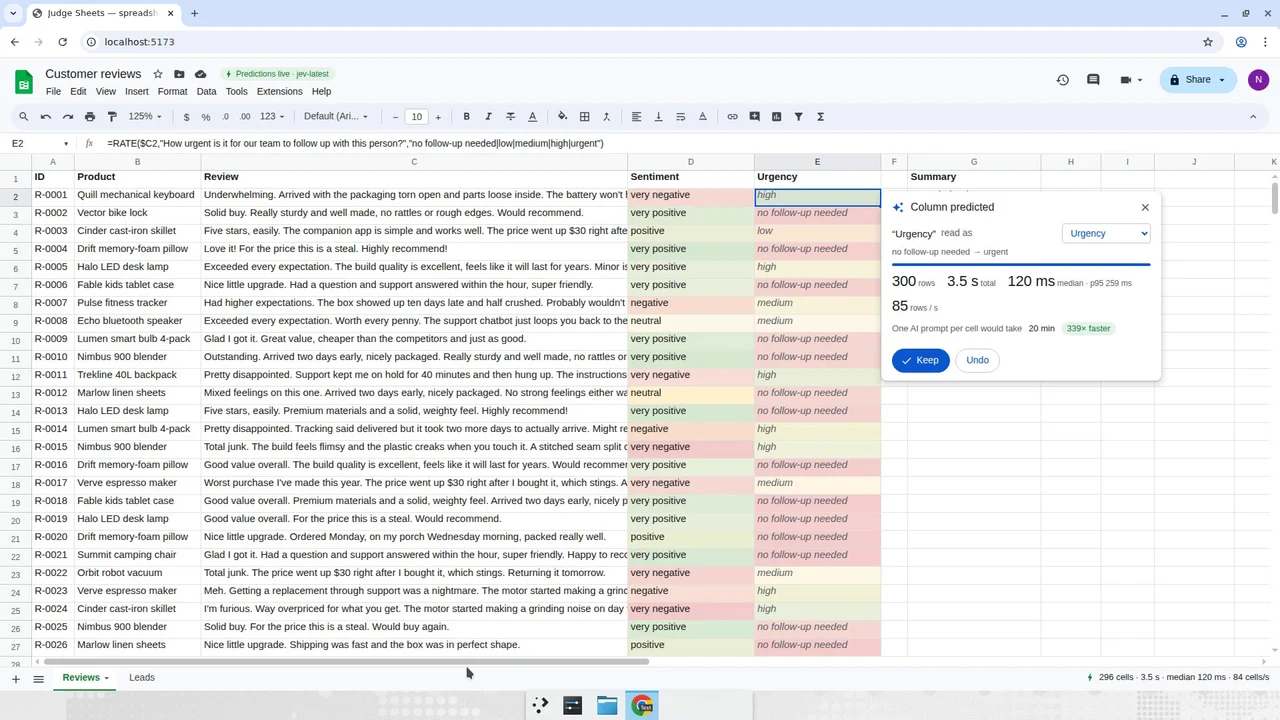
Let the header ask the question
Judge Sheets puts a semantic question where a spreadsheet user already works: the column header. Type a label such as “Urgency” or “Ready to buy?” beside text rows, review its interpretation, and predict a new column.
The standalone project uses Jev to interpret the header and evaluate the rows. Predictions flow through its own spreadsheet engine. You can inspect the result and keep or undo the column, rather than treating a generated label as unquestionable truth.
Read the result like a spreadsheet
- Check that the interpreted question matches what you meant by the header.
- Compare predictions against the source text in individual rows.
- Inspect borderline cases before using a summary or ranking downstream.
Where to take the idea
A small table of product feedback makes a good starting experiment. Define a rubric that another person can apply, then compare the predicted column with human judgments. Keep the original text visible so the labels remain easy to challenge.
A familiar interface, a separate project

This is not an official Google Sheets integration. Nader Dabit’s repository provides the application, setup instructions and replay mode. The media below comes from that project. JevFlow does not upload, store or process spreadsheets, and the Try page is an early-access preview.
SEE IT IN ACTION
Judge Sheets, in motion.
Original demo media by Nader Dabit. Open media ↗
Media not loading? View it in the original project ↗